Faceless videos, from one line.Your first month is free.
Ginie is an AI video generator for faceless channels. Type one line. Ginie writes the script, makes a still for each of the 6 scenes, animates each one, records the narration, times the captions to the words, adds music and hands you a 30-second 9:16 MP4 exported at 1080x1920, usually in 3 to 7 minutes. Your first month is free on Lite and Daily: a card is entered at checkout, nothing is charged for 30 days, and the plan price is charged automatically from the second month unless you cancel. The first video card is an illustrated walkthrough with sped-up playback; renders take minutes. The format reels and images are real AI output: the format reels were rendered by Ginie through the same pipeline and API the create form uses, each from the prompt shown; the Series card shows the product's own screen. 5 earlier showcase reels were rendered on 2026-09-05 by a script, Flux 2 Pro stills with Gemini Omni Flash 1.1 motion, and are not create-form orders: they carry no prompt, project id or price. For example: Historical Epic: a 35-second 9:16 video Ginie rendered from the prompt "A stylized 3D cinematic retelling of history: Hannibal at the moment he decides to cross the Alps with elephants." - Flux 2 Pro stills animated by H3 Max Turbo, narrated by ElevenLabs, cast per story. It came from project 0ceb014b-1597-4dbc-86c5-aafe8abb5560, rendered on 2026-09-17, and cost 156 credits at list price.
AI-generated
AI-generated
AI-generated
AI-generated
AI-generated
AI-generated
Scene 1 of 6 — Rome expects him to surrender. Instead, Hannibal…
Historical Epic, 1 of 9
The prompt that made this video
A stylized 3D cinematic retelling of history: Hannibal at the moment he decides to cross the Alps with elephants.
Template
Historical Epic
Made with
Flux 2 Pro stills · H3 Max Turbo motion · ElevenLabs, cast per story
Shape
6 scenes · 35 s (ordered at 30 s) · 9:16, exported at 1080x1920
Price
156 credits at list price · the same settings as the default first project
Rendered
2026-09-17 · project 0ceb014b
One line in. Script, six animated scenes, narration, captions, music: a 30-second 9:16 video, usually in 3 to 7 minutes. A Series renders a new one on the days you choose.
✓This button starts Daily: 500 credits, $0 for 30 days, then $39 a month unless you cancel. Exports carry a Ginie watermark during the free month, none after. Lite ($19, 250 credits, watermarked exports) is on the pricing cards.
✓Default first project: 30 s · Flux 2 Pro stills · H3 Max Turbo motion · narrated · captioned — at the normal price. The price shows before you click Generate
✓Renders that fail are refunded
Every format reel on this page was rendered by Ginie from the prompt shown; the 5 earlier reels were made by a script, and their notes say what made them. No stock footage, no mock-ups.
01 — Formats
Pick a format. The whole video follows.
22 formats. Each one fixes the hook, the beats, the voice, the captions and the music. You add the idea.
Ginie has 22 formats. Each one fixes the hook, the beats, the voice, the captions and the music; you add the idea. Every format reel in this section is a real export ordered at 30 seconds (the finished files run 23-35 s), made through the same create API the form uses. The 9 format reels: Cryptid Vlog from the prompt "A swamp cryptid tries to order a coffee through a drive-through" (6 scenes, 28 seconds, H3 Max Turbo, project dc840ca0, rendered 2026-09-16); POV: You Wake Up As from the prompt "POV: you wake up as a lighthouse keeper in 1899 and the light has gone out" (6 scenes, 28 seconds, Seedance 1.0 (fal), project 7f51cf3f, rendered 2026-09-17); Micro-Drama from the prompt "A wedding planner finds her own name on the groom's second guest list" (6 scenes, 28 seconds, Kling 3.0, project a0175346, rendered 2026-09-17); Paper Cutout Explainer from the prompt "Why do onions make you cry?" (6 scenes, 23 seconds, H3 Max Turbo, project 80325ac5, rendered 2026-09-17); Found Footage from the prompt "A babysitter's camcorder, tape 3, the night the baby monitor started answering" (6 scenes, 35 seconds, Seedance 1.0 (fal), project 5edc9526, rendered 2026-09-17); Ink Wash Fable from the prompt "The fisherman who caught the moon's reflection and would not give it back" (6 scenes, 30 seconds, H3 Max Turbo, project ac9c4c99, rendered 2026-09-17); Historical Epic from the prompt "A stylized 3D cinematic retelling of history: Hannibal at the moment he decides to cross the Alps with elephants." (6 scenes, 35 seconds, H3 Max Turbo, project 0ceb014b, rendered 2026-09-17); Horror Stories from the prompt "The babysitter who heard footsteps upstairs — while the kids were asleep beside her" (6 scenes, 34 seconds, H3 Max Turbo, project 493971ae, rendered 2026-09-17); Fashion Morph from the prompt "One model, one white shirt, styled for six cities" (6 scenes, 25 seconds, Kling 3.0, project f73964e4, rendered 2026-09-17). 5 earlier showcase reels were rendered on 2026-09-05 by a script, Flux 2 Pro stills with Gemini Omni Flash 1.1 motion, and are not create-form orders: they carry no prompt, project id or price. For 30 seconds a format with no multiplier costs 36 credits as stills, 156 animated by H3 Max Turbo and 366 on Kling 3.0; formats with a multiplier show their own figure in the form.
When Dinosaurs Ruled, 1 of 14
AI-generated
When Dinosaurs Ruled
History documentary short, narrated
Made by a script · not on the create form
AI-generated
Ancient Wonders Rebuilt
History documentary short, narrated
Made by a script · not on the create form
AI-generated
Cities of Tomorrow
Sci-Fi documentary short, narrated
Made by a script · not on the create form
AI-generated
Earth's Most Beautiful Places
Nature documentary short, narrated
Made by a script · not on the create form
AI-generated
Nature's Raw Power
Nature documentary short, narrated
Made by a script · not on the create form
Real export · 28 s
Cryptid Vlog
Give a creature a chore; get its selfie vlog of trying, same creature every episode
156 credits, list price for a 30-second order
Real export · 28 s
AI-generated
POV: You Wake Up As
Name a role and a year; get thirty seconds of their morning in first person
336 credits, list price for a 30-second order
Real export · 28 s
AI-generated
Micro-Drama
Give a betrayal; get a thirty-second episode with a cliffhanger and the same cast tomorrow
366 credits, list price for a 30-second order
Real export · 23 s
Paper Cutout Explainer
Ask a why-question; get the 30-second answer in layered paper
156 credits, list price for a 30-second order
Real export · 35 s
AI-generated
Found Footage
Describe a recovered tape; get timestamped, hand-held dread with something in frame
336 credits, list price for a 30-second order
Real export · 30 s
Ink Wash Fable
Name a folk tale; get it told in thirty seconds of brush and ink
156 credits, list price for a 30-second order
Real export · 35 s
Historical Epic
One legendary figure at the decisive moment
156 credits, list price for a 30-second order
Real export · 34 s
AI-generated
Horror Stories
Scary narratives
203 credits, list price for a 30-second order
Real export · 25 s
AI-generated
Fashion Morph
Pick one garment or one model; get six looks in thirty seconds and a vote
366 credits, list price for a 30-second order
1 / 14
When Dinosaurs Ruled
AI-generated
History documentary short, narrated.
3 scenes · 15 s · 9:16 · Flux 2 Pro + Gemini Omni Flash 1.1 · OpenAI tts-1-hd, voice Echo
Made by a script, not ordered on the create form: rendered 2026-09-05 on Gemini Omni Flash 1.1, which the create form does not sell. No create-form prompt or price; nearest format: AI Documentary.
What made this reel
Made by a script, not a create-form order: rendered 2026-09-05 by scripts/regenerate_showcases_15s.py (Flux 2 Pro stills, Gemini Omni Flash 1.1 motion, OpenAI tts-1-hd, voice Echo). Gemini Omni Flash 1.1 is not offered on the create form, so this reel has no create-form prompt or price; the nearest format is AI Documentary.
Two hundred million years ago, the earth belonged to giants. Titanosaurs taller than buildings moved through forests of ancient ferns. Pteranodons soared above oceans that covered half the world.
9 format reels: real export · narrated · made through the same pipeline, settings and price as your create form. The 5 earlier reels were rendered 2026-09-05 by a script, not from the create form: no prompt, project or price; their notes say what made them.
02 — What you can make
Type a line. Get one of these.
Four things to make: an illustrated video walkthrough, a real Series screen, and real image outputs.
What you can make with Ginie. The first card is an illustrated walkthrough of a prompt becoming a video and a Series, with sped-up playback; renders take minutes. A narrated, animated video: type one line and get a 30-second 9:16 MP4 with 6 animated scenes, narration, captions timed to the words and music, usually in 3 to 7 minutes; every one of the 22 formats is on every plan. A video for your channel every day: set a series to run daily, weekly or monthly, and every run writes a new script and renders on schedule; each video lands in Projects as an MP4 you upload yourself (YouTube auto-publishing is not open to customers yet). Pictures in every Instagram size: 44 presets in 4 sizes (Story / Reel 9:16, Instagram post 1:1, Portrait post 4:5 and Landscape 16:9), from 3 credits per image. A picture fixed where you point: mark up to 6 places on a picture, name them and say what changes; everything else stays, from 2 credits per edit. Under the hood: Type one line. Ginie writes the script, makes a still for each of the 6 scenes, animates each one, records the narration, times the captions to the words, adds music and hands you a 30-second 9:16 MP4 exported at 1080x1920, usually in 3 to 7 minutes. Length options: 15 s = 4 scenes, 30 s = 6 scenes, 60 s = 10 scenes, 120 s = 18 scenes, 180 s = 24 scenes. You can regenerate a single scene and leave the others and pick a different model for each scene; a failed render returns its credits.
A narrated, animated video
From a prompt to a finished video, then a Series. An illustrated walkthrough; renders take minutes.
This button starts Daily: 500 credits, $0 for 30 days, then $39 a month unless you cancel. Exports carry a Ginie watermark during the free month, none after. Card required at checkout. Cancel from Settings before the free month ends and nothing is charged.
This button starts Daily: 500 credits, $0 for 30 days, then $39 a month unless you cancel. Exports carry a Ginie watermark during the free month, none after. Card required at checkout. Cancel from Settings before the free month ends and nothing is charged.
A series writes and renders a new video on the days you choose; each one lands in Projects as a finished MP4.
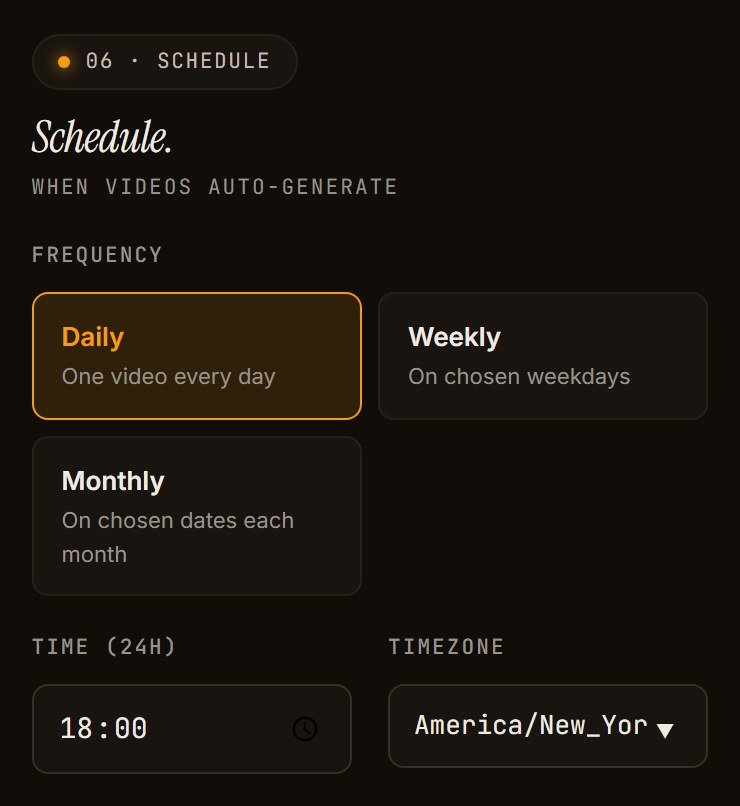
Series autopilot. A series writes a fresh script on every run and renders on the days you choose; each video lands in Projects as a 1080x1920 MP4 you download and upload yourself. Scheduled auto-publishing to YouTube is not open to customers yet; the scheduler checks every 60 seconds. A daily 30-second video on stills is about 36 credits a day. Credits are debited when a run starts and refunded if it fails. Active series per plan: Lite 1; Daily 2; 2x 3; Scale 15; Agency 40; Studio 150.
/dashboard/series/create
The bottom of the series form, captured 2026-09-17: a crop of the full-page capture, nothing edited.
The schedule step of the series form on a phone, captured 2026-09-17.
The 47 credits on the form: Horror Stories, 30 s, on stills (36 for a format with no multiplier; Horror Stories carries one).
A video every day for 30 days
Stills only: every scene is an AI image with a slow pan, not an animated clip.
15 s on Flux Schnell stills: 330 credits, fits the Daily plan ($39)
30 s on Flux 2 Pro stills: 1,080 credits, fits the 2x plan ($69)
This button starts Daily: 500 credits, $0 for 30 days, then $39 a month unless you cancel. Exports carry a Ginie watermark during the free month, none after. Card required at checkout. Cancel from Settings before the free month ends and nothing is charged.
Active series at once — Lite plan: 1 · Daily plan: 2 · 2x plan: 3 · Scale plan: 15 · Agency plan: 40 · Studio plan: 150
Make the picture, then change only the part you mark.
44 presets, 4 sizes. Mark up to 6 places, name them, say what changes.
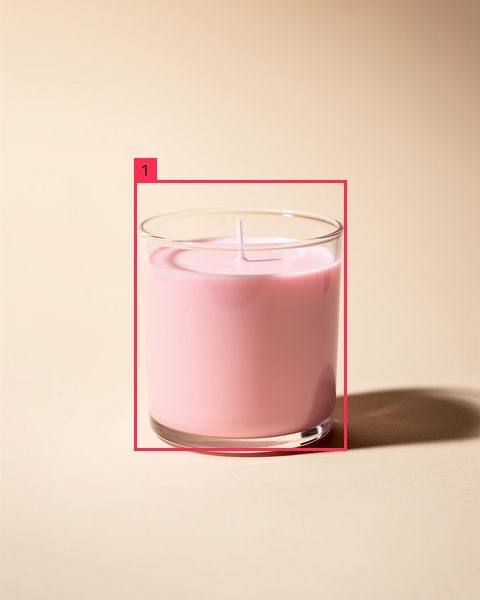
The image generator has 44 presets and 4 sizes (Story / Reel 1008x1792, Instagram post 1024x1024, Portrait post 1024x1280 and Landscape 1792x1008). Nano Banana 2.1 makes the same 4 shapes at 1K, 2K and 4K. Upload a photo or make one, pick a preset, mark up to 6 places on the picture, name them, and say what changes at each name; everything else stays. From 3 credits per image; edits from 2. The example on this page is one real edit: "make @candle deep forest green with a small gold label" with Nano Banana 2 for 4 credits.
What the model was actually sent for the edit shown: Image 1 is the picture to edit. Image 2 is the same picture with numbered boxes drawn on it: box 1 marks 'candle' (a medium-sized area at the centre of the picture). Edit request: make box 1 ('candle') deep forest green with a small gold label. Apply only the change described; keep everything else exactly as in image 1 - composition, lighting, colours, identity and text. Do not draw the boxes, numbers or any marker in the output.
BeforeAfter
Edit prompt
make @candle deep forest green with a small gold label
One real edit with Nano Banana 2 — 4 credits.
01
Upload
Attach your own photo as @name, as shown, or type the subject. This run typed it.
02
Generate
Pick a preset. This run typed the subject: Flux 2 Pro, 3 credits.
03
Mark a place
Draw a box, give it a name.
04
Edit
Say what changes at @candle. Everything else stays.
What Ginie actually sent to the modelShowHideImage 1 is the picture to edit. Image 2 is the same picture with numbered boxes drawn on it: box 1 marks 'candle' (a medium-sized area at the centre of the picture). Edit request: make box 1 ('candle') deep forest green with a small gold label. Apply only the change described; keep everything else exactly as in image 1 - composition, lighting, colours, identity and text. Do not draw the boxes, numbers or any marker in the output.
Nano Banana 2 edit, 4 credits, one marked place (@candle).
Captured 17 September 2026; the pictures are the run's real output.
Sticker pack
Anime
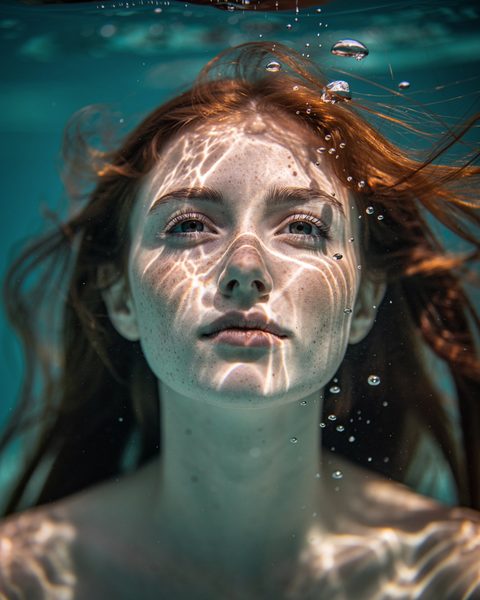
Underwater
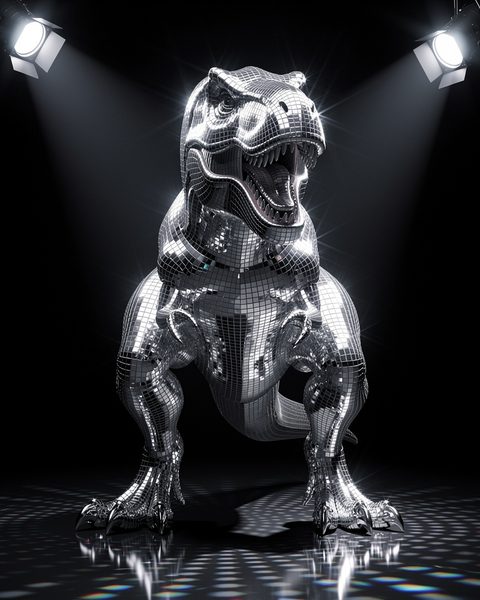
Disco chrome
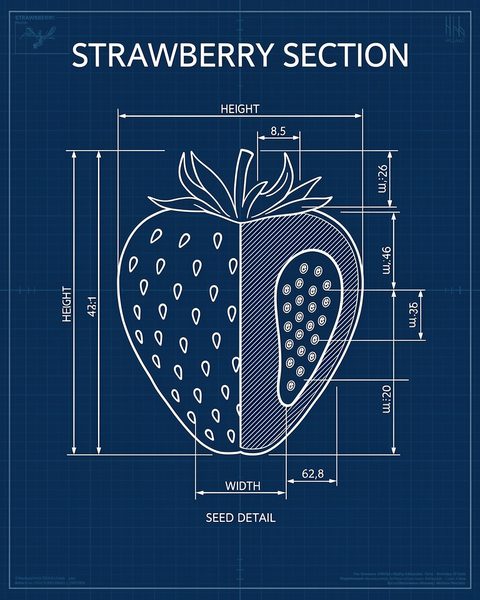
Blueprint poster
Comic
Tarot card
Action figure
Poster
Logo
Headshot
Merch
12 of 44 presets, rendered by Flux 2 Pro · 9:16 1008x1792 · 1:1 1024x1024 · 4:5 1024x1280 · 16:9 1792x1008
This button starts Daily: 500 credits, $0 for 30 days, then $39 a month unless you cancel. Exports carry a Ginie watermark during the free month, none after. Card required at checkout. Cancel from Settings before the free month ends and nothing is charged.
05 — What it costs
The price, before you click.
A 30-second video costs 6 credits from your own images, 36 on AI stills, 156 animated. You see the exact total before anything renders.Daily gives 500 credits a month: $0 for the first 30 days, then $39 a month.
What a 30-second video costs: 6 scenes plus 6 credits of narration. Flux 2 Pro stills (Ken Burns) 5 credits per scene, 36 for 30 seconds; Kling 3.0 60 credits per scene, 366 for 30 seconds; Seedance 2 55 credits per scene, 336 for 30 seconds; Seedance 2 Fast 30 credits per scene, 186 for 30 seconds; H3 Max Turbo 25 credits per scene, 156 for 30 seconds; H3 Max 45 credits per scene, 276 for 30 seconds; Veo 3.1 Fast 125 credits per scene, 756 for 30 seconds; Kling 3.0 with audio 85 credits per scene, 516 for 30 seconds. A 15-second video is 4 scenes plus 3 credits of narration: Flux 2 Pro stills (Ken Burns) 23; Kling 3.0 243; Seedance 2 223; Seedance 2 Fast 123; H3 Max Turbo 103; H3 Max 183; Veo 3.1 Fast 503; Kling 3.0 with audio 343. Stills only, by image model, 15 and 30 seconds: Flux Schnell 11 and 18; Flux 2 Pro 23 and 36; Nano Banana 23 and 36; Nano Banana Pro 75 and 114; Gaming Stock 7 and 12; Custom Images 3 and 6. Videos a month each plan's credits buy at 30 seconds, list price with no format multiplier (credit arithmetic; unused credits roll over while you stay subscribed): Flux 2 Pro stills (Ken Burns): Lite 6, Daily 13, 2x 41, Scale 66, Agency 250, Studio 638; Kling 3.0: Lite 0, Daily 1, 2x 4, Scale 6, Agency 24, Studio 62; Seedance 2: Lite 0, Daily 1, 2x 4, Scale 7, Agency 26, Studio 68; Seedance 2 Fast: Lite 1, Daily 2, 2x 8, Scale 12, Agency 48, Studio 123; H3 Max Turbo: Lite 1, Daily 3, 2x 9, Scale 15, Agency 57, Studio 147; H3 Max: Lite 0, Daily 1, 2x 5, Scale 8, Agency 32, Studio 83; Veo 3.1 Fast: Lite 0, Daily 0, 2x 1, Scale 3, Agency 11, Studio 30; Kling 3.0 with audio: Lite 0, Daily 0, 2x 2, Scale 4, Agency 17, Studio 44. Some formats carry a multiplier; the form shows the exact figure before you click Generate. Renders that fail are refunded; nothing bills without a price you saw first.
Your first video
156 credits
30 s · Flux 2 Pro stills · H3 Max Turbo motion · ElevenLabs narration · captions · music. The same price as any later video. Daily's free month holds 500 credits; this video uses 156 of them.
/dashboard/create
Preflight receipt, captured 2026-09-17: credits, scenes, duration and the scene-by-scene plan before anything renders. Not confirmed; no render was started.
The list price of a 15-second and a 30-second video per model, with no format multiplier, and on wider screens the credits per scene.
Model
Per scene
A 15 s video
A 30 s video
Your own images (Ken Burns)
0 cr
3 cr
6 cr
Gaming Stock (gameplay footage)
1 cr
7 cr
12 cr
Flux Schnell stills (Ken Burns)
2 cr
11 cr
18 cr
Flux 2 Pro stills (Ken Burns)
5 cr
23 cr
36 cr
H3 Max TurboFirst video
Loop from Cryptid Vlog, rendered 2026-09-16
25 cr
103 cr
156 cr
Seedance 2 Fast
Flux 2 Pro still + motion
30 cr
123 cr
186 cr
H3 Max
Flux 2 Pro still + motion
45 cr
183 cr
276 cr
Seedance 2
Flux 2 Pro still + motion
55 cr
223 cr
336 cr
Kling 3.0
Loop from Micro-Drama, rendered 2026-09-17
60 cr
243 cr
366 cr
Kling 3.0 with audio
Flux 2 Pro still + motion
85 cr
343 cr
516 cr
Veo 3.1 Fast
Flux 2 Pro still + motion
125 cr
503 cr
756 cr
A 15-second video is 4 scenes plus 3 credits of narration; a 30-second one is 6 scenes plus 6. Every video is 9:16, exported at 1080x1920. Renders that fail are refunded, and unused credits roll over while you stay subscribed.
Your format can change the price. On H3 Max Turbo at 30 seconds, 17 of the 22 formats cost the 156 in the table. 3 cost more, up to Horror Stories at 203. App Demo and Movie Chunks cost the same on every model.
This button starts Daily: 500 credits, $0 for 30 days, then $39 a month unless you cancel. Exports carry a Ginie watermark during the free month, none after. Card required at checkout. Cancel from Settings before the free month ends and nothing is charged.
06 — Pricing
Monthly credits. First month free.
Every model on every plan. The plans differ in credits, active series, videos in the queue at once and, higher up, connected YouTube channels (when auto-publish opens). First month free on Lite and Daily: card at checkout, then $19 or $39 a month unless you cancel.
Plans: Lite $19 a month for 250 credits and up to 1 active series (first month free, card required); Daily $39 a month for 500 credits and up to 2 active series (first month free, card required); 2x $69 a month for 1,500 credits and up to 3 active series; Scale $129 a month for 2,400 credits and up to 15 active series; Agency $399 a month for 9,000 credits and up to 40 active series; Studio $999 a month for 23,000 credits and up to 150 active series. Every plan includes every format and every model; the plans differ in credits, the active-series cap, the renders at a time, the connected-channel cap on Lite, Agency and Studio (YouTube auto-publishing is not open to customers yet) and the watermark on Lite. Every export made during the free month on Lite and Daily carries a small "Made with ginie.io" mark. Outside the free month, only Lite renders carry it. New accounts hold 0 credits until a plan starts.
First month free
Lite
$19/mo
250 cr / mo
At 15 s, a month buys about:
22videos on Flux Schnell stills10on Flux 2 Pro stills2animated (H3 Max Turbo)
Your first video (30 s, animated) takes 156 of them
First month free — card required, cancel anytime, then $19/month
All 22 formats, every model
1 active series at once
Up to 1 connected YouTube channel (when auto-publish opens)
Video counts are 15-second videos a month at list price: Flux Schnell stills 11 credits, Flux 2 Pro stills 23 credits, animated (H3 Max Turbo) 103 credits. Longer videos and most other models cost more; every model is priced in the table above.
Renders that fail are refunded. Free-month plans renew at the listed price after 30 days. Unused credits roll over while you stay subscribed.
Frequently asked questions about what Ginie does, the free month, YouTube's inauthentic-content policy, models, render time, cost, editing, autopilot, publishing targets and whether the page is real product output.
Everything between your idea and a finished video. Type a prompt, or pick one of 22 formats, and Ginie writes the script, records the narration, makes the visuals (AI stills, AI motion, gameplay overlay or your own images), adds music, times the captions to each spoken word and renders a 9:16 MP4 at 1080x1920. A Series writes and renders a new video on the days you choose, and each one lands in Projects as a 1080x1920 MP4 you download and upload yourself; scheduled auto-publishing to YouTube is not open to customers yet. The videos are yours to keep and post anywhere.
Yes. Lite and Daily start with a free month: you enter a card at checkout, pay $0 today, and the plan price ($19 or $39 a month) is charged automatically after 30 days unless you cancel first. The renewal date is shown in Settings; cancel before it and nothing is charged. One free month per person. Every export made during the free month on Lite and Daily carries a small "Made with ginie.io" mark. Outside the free month, only Lite renders carry it. 2x, Scale, Agency and Studio start at the listed price. New accounts hold 0 credits until a plan starts.
No tool can promise that; YouTube decides. Its inauthentic-content policy (July 2025) targets mass-produced, repetitive uploads, not AI tools as such; AI-assisted channels stay eligible. What Ginie does: every run writes a new script from a new topic and renders new scenes for it, you pick from 22 formats and 22 voices, and any scene can be re-prompted. What you do: keep one niche per channel, rotate formats and voices across uploads, and re-prompt a scene that looks like the last run. Ginie does not score your channel for variety; that part is yours.
Your first project can use the first-video preset: 30 seconds, 6 scenes, Flux 2 Pro stills, H3 Max Turbo motion, ElevenLabs narration, captions and music, at the normal price of 156 credits for a format with no multiplier and no fixed beat count. It is offered on your first project only, with a typed prompt and any format whose fixed scene count is 6 or fewer. The reels on this page whose notes name H3 Max Turbo were rendered with exactly these settings; the others' notes name their motion model.
Images: Flux Schnell, Flux 2 Pro, Nano Banana and Nano Banana Pro, plus gameplay stock and your own uploads. Motion: Kling 3.0, Seedance 2, Seedance 2 Fast, H3 Max Turbo, H3 Max and Veo 3.1 Fast, or no motion (a still with a slow pan). Narration: ElevenLabs (22 catalog voices plus an adaptive mode that casts a narrator per story), with Gemini Flash-Lite narration as the fallback. You choose per scene: a Kling 3.0 shot can sit next to an H3 scene next to a still in one video.
Minutes, not seconds. Stills only usually finish in 1 to 4 minutes; H3 Max Turbo in 3 to 7; Kling 3.0 in 4 to 10; Veo 3.1 Fast in 5 to 12. A busy queue adds to that, and the app shows your queue position and a live estimate while it works.
Credits are charged per scene, and a 30-second video has 6 scenes plus 6 credits of narration. On Flux 2 Pro stills that is 36 credits; animated by H3 Max Turbo 156; by Kling 3.0 366; by Veo 3.1 Fast 756. Some formats carry a multiplier, and the form shows the exact figure before you click Generate. Renders that fail are refunded.
Yes. The editor after generation covers per-word caption timing, the voice, the music and per-scene re-prompts. One scene wrong? Regenerate that scene; the others stay as they are.
Pick a format, load a topic queue, set a schedule (daily, chosen weekdays or days of the month). On every run Ginie writes a fresh script and renders the video, which lands in Projects as a 1080x1920 MP4 you download and upload yourself; the scheduler checks every 60 seconds. Scheduled auto-publishing to YouTube is not open to customers yet. A daily 30-second video on Flux 2 Pro stills is about 36 credits a day, or 1,080 a month; on gameplay stock about 12 a day, or 360 a month, which fits inside Daily ($39, 500 credits). Credits are debited when a run starts and refunded if it fails.
YouTube is the only integration, and scheduled auto-publishing is not open to customers yet; today a Series renders on schedule and each video lands in Projects as a 1080x1920 MP4 you download and upload yourself. TikTok and Instagram are not connectable accounts.
Yes. The videos are yours to post and monetize. Stock footage carries standard commercial-use licences; platforms set their own rules for AI-assisted content.
Renders stop. There are no overage fees and nothing bills beyond the plan price. The plan renews automatically at the listed price, including after a free month, until you cancel. Unused credits roll over while you stay subscribed and are forfeited when the subscription ends. Failed renders are refunded.
The first video card is an illustrated walkthrough of a prompt becoming a video and a Series; playback is sped up, and renders take minutes. The format reels and images are real AI output. The format reels were rendered by Ginie through the same pipeline and API the create form uses; the Series card shows the product's own screen. Each format reel shows the prompt that made it and the project it came from (9 format reels rendered 2026-09-16 and 2026-09-17; the project id is printed under each reel). Where a provider was unavailable and a cheaper model rendered a reel, the reel says so. 5 earlier showcase reels were rendered on 2026-09-05 by a script, Flux 2 Pro stills with Gemini Omni Flash 1.1 motion, and are not create-form orders: they carry no prompt, project id or price.
Cryptid Vlog
POV: You Wake Up As
Micro-Drama
Your first month is free.Your first video is about 3 to 7 minutes of rendering away.
Start your free month on Lite and Daily. Card required, cancel anytime; the exact price of every video is shown before you click Generate.
This button starts Daily: 500 credits, $0 for 30 days, then $39 a month unless you cancel. Exports carry a Ginie watermark during the free month, none after. Lite ($19, 250 credits, watermarked exports) is on the pricing cards above. The exact price of every video is shown before you click Generate.